Pages

New Improved Google Search !!!!!!

Custom Search
Showing posts with label YAHOO HACKING. Show all posts

Jul 23, 2011

Learn how to connect Yahoo, Gmail and Facebook accounts – A tactical move by Yahoo


I never imagined that this can happen , this morning, Yahoo brought me pleasant surprise of connecting my Gmail  account with my Gmail one, & even my Facebook id. Wow !!! Think about one world theory :) Yahoo states that the transition will take some time.Like the hell I care..
I quickly connected my Gmail account to check if it works, voila it worked seamlessly, now you can sign in into one ID & can enjoy the benefits of Gmail & Yahoo simultaneously. Here is how you can do that.
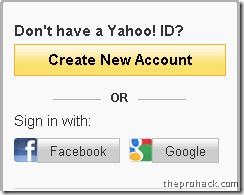
Go to Yahoo mail & click on the respective Gmail button.

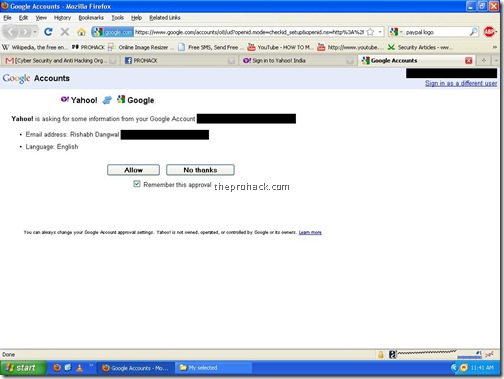
Once done, Google will prompt you if you want to grant access to Yahoo, click Allow to do that.

grant access to Yahoo, click Allow to do that.

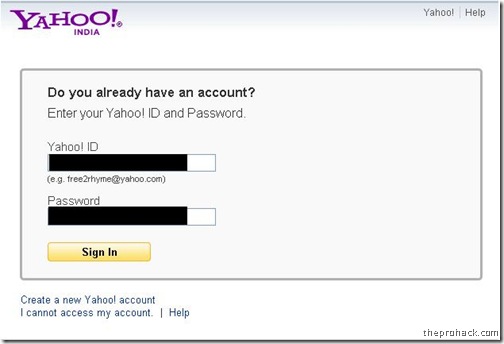
Once done, you will be prompted to enter username password & other fields, click on top link to sign in if you already have a Yahoo Id. Enter your Yahoo Id & click sign in..
Enter your Yahoo Id & click sign in

Voila.you are done :) Now you have all the goodies of your social world at one place :)
Why Yahoo did that ?
Seeing that it has dropped down to 4th rank worldwide according to Alexa, yahoo quickly had to make a move..First Google, then Facebook & Youtube. Seems like everybody was trampling it over & getting ahead. So it was a tactical move to entice the the Google followers to have a piece of Yahoo :)
(click on image to see the top sites)
Click on image to see the top sites
as the old adage says,
If You Can't Beat 'Em, Join 'Em ..
A tactical move by Yahoo :)

May 19, 2011

-: Running Multiple Instances of Google Talk :-

-: Running Multiple Instances of Google Talk :-


http://www.knowbest.info/wp-content/PostImages/gtalk-widget.png


Users of Google Talk (GTalk) can also let GTalk go to polygamy, that’s running multiple instances of Google Talk and login to multiple Google accounts on Google Talk. The polygamy trick can be done without any crack, patch or hack, with just a simple command line parameter or switch /nomutex appended to the Google Talk shortcut.

Ability to polygamy running multiple Google Talk is useful if users have multiple Google Talk accounts (or Google or Gmail accounts that used to login to GTalk) or multiple profiles or personalities, and don’t want to log on and off from one account to another account every time when want to switch, or want to log in to all accounts at the same time on the same computer.

You can add the /nomutex switch or parameter to existing Google Talk shortcut, or create a new shortcut with the /nomutex command line parameter.

To edit existing Google Talk shortcut:

1) Right click on the Google Talk shortcut.
2) On the right click contextual menu, click on Properties.
3) Go to Shortcut tab on Google Talk Properties window.
4) On the Target textbox, add in the /nomutex to the end of the line so that it looks like below (or you can simply copy and paste the below syntax and replace the original).

Target: "C:\Program Files\Google\Google Talk\googletalk.exe" /nomutex

5) Click on OK.


To create a new shortcut for Google Talk:

1) Right-click on the desktop or anywhere you want to place the GTalk shortcut.
2) Select New on the right click context menu.
3) Then select Shortcut.
4) Copy and paste the following line to the text box when prompted to type the location of the item:

“C:\Program Files\Google\Google Talk\googletalk.exe” /nomutex

5) Click on Next.
6) Give the shortcut a proper name such as Google Talk or Google Talk Multiple or Google Talk Polygamy.
7) Click OK until you are done.

If you have hex editor, you can act like a hacker and modify the bits in Google Talk program so that it will always allow multiple instances of GTalk to be launched whether the /nomutex switch is specified or not.

Launch hex editor and open googletalk.exe, then search for the following patterns in the hex editor:

004536FD . 3BC6 CMP EAX,ESI
004536FF . 75 05 JNZ SHORT googleta.00453706

Modify the string to look like the following:

004536FD . 8BC1 MOV EAX,ECX
004536FF . EB 05 JMP SHORT googleta.00453706


How this Works?
The mutex is short for mutual exclusion object.
A mutex is a program object that allows multiple program threads to share the same resource, but not simultaneously.

So, in the hack above, we used nomutex (no-mutex) to use the same resources simultaneously....!

May 3, 2011

How 8 People Can Use The Same Msn Dial Up Account ?

 http://onlinevideodownloader.net/wp-content/uploads/2010/08/MSN_logo.png


How 8 People Can Use The Same Msn Dial Up Account ?

its easy really. want to have an entire family on dial-up with just one bill?

step one. purchase 20 dollar a month subscription to MSN unlimited access dial up. This will include an MSN 9 cd which you will need. With the software installed, fill up your secondary account slots with new users. Make sure you pick @msn if it gives you the choice, hotmail email addresses will not work..

say the secondary account is johnsmith@msn.com type in the Dial up connection

USER : MSN/johnsmith
PASS: ******* (whatever)

connect to your local msn phone number and the other people you gave secondary accounts to will be able to do the same, while you are connected. Its a sweet deal considering everyone is paying about 2 bucks a month for internet access, especially if you cannot get broadband. if you wanted to sell off the access to people you could actually make money doing this.. but i do not suggest it.

I used to be an msn tech and this was a little known secret even to most of the employees.

After you do this you do not need the software any more. I would suggest keeping it on to micromanage everyone else’s accounts. and for the simple fact that if they don’t pitch in, cut them off HEHEHE

i’m on broadband now so i dont care if i tell you my little secret. anyone else knew of this?

Jul 13, 2010

Yahoo Messenger Hidden Emoticons Without Addons

   Yahoo Messenger have some default emoticons which are visible to all the users who use the messenger services. But there are some hidden emoticons in yahoo which are not visible to any one and some of them are really very expressive. But don't know why yahoo has hidden them. As emoticons are very useful to express our feelings in chat we often try to use some thing new and different from others. I have some really cool hidden emoticons here just save them and surprise your friends.
                                   
                               These are some cool hidden emoticons in yahoo and please don't mind few are repeating here. But i bet some of them are really not known for most of us. Here are some more emoticons which would surprise your friends.
                                You can also use a yahoo emoticon assistant (yea) for hidden emoticons and use it for chat. All you have to do is to download a small application for this and install this and and after the setup just open the application and then yahoo chat messenger and select a chat window and send the emoticon by double clicking the icon.
 

Jul 11, 2010

How To Change Password in Yahoo Orkut Facebook Gmail MSN & Rediffmail

   Its Easy to change passwords in some famous websites and mailing services but people often don't find the change password option in some sites like Yahoo, Orkut, Rediffmail, MSN and Gmail so i taught why dont we write for all the password change locations in a single post. You can find Each individual password procedure in many sites but here look at all of them who are searched more often. All at once.


I) Orkut:

1) If you are using gmail account for orkut you can sign into google accounts and change it. If you are using then follow the below steps.
2) Look for seetings which is beside gallery up when you sign in and then click on settings.
3) Click on General (3rd tab) and click on google account seetings and now you will be redirected to the google accounts page.
4) Here you can see a option called change password. 
5) click on that and now change accordingly to ur wish.
6) You have many more options here if u are using a gmail account for orkut. 


II) Yahoomail: 

1) To Change your password in yahoo you have to follow some steps here.
3) Click the above link and you will be asked to log in.
4) Log in and type the current password and new one twice and save.
5) Click Continue and now you have to sign in with new password.
6) Done !


III) Gmail:

1) This is a bit simple than yahoo.
2) Just Log in with old password and ID.
3) Click on Seetings and now open Accounts and Imports tab.
4) Now click on Google Account Settings and in new window click on change password under the personal information option.
5) Enter the old password and new password now and save it.
6) Done !

IV) Facebook:

1) This is very easy when compared to all others.
2) Just log in and on the top look for Settings.
3) Click on Settings and Again "Account Settings"
4) Look for Password there and change it.
5) Done !


v) Rediffmail:
1) Log in to your rediffmail account.
2) Find Settings and click it.
3) Now Under Settings click on Account Info.
4) Now you can see Change Password.
5) Open it and enter your old password and then save with a new one.
6) Save and Exit. 
7) Done !


VI) MSN Live:

1) Log in to your msn account.
2) Under the Right Side you will find your Name with Image.
3) Click on that and again click on "Account Overview".
4) There you will find Password: ******* and change beside it.
5) Click on change and now enter your old and new password.
6) Save and Exit.
7) Done !

If You are using accounts of googlen you can directly go to google accounts and change there . Eg: Blogger, Blogspot, yutube, Adsense and Etc.

Jul 7, 2010

What to do when your Email Account is Hacked?

How to Recover Hacked Email Accounts?

 
Email Hacked?It can be a real nightmare if someone hacks and takes control of your email account as it may contain confidential information like bank logins, credit card details and other sensitive data. If you are one such Internet user whose email account has been compromised, then this post will surely help you out. In this post you will find the possible ways and procedures to get back your hacked email account.
 

For Gmail:

 
It can be a big disaster if your Gmail account has been compromised as it may be associated with several services like Blogger, Analytics, Adwords, Adsense, Orkut etc. Losing access to your Gmail account means losing access to all the services associated it with too. Here is a list of possible recovery actions that you can try.
Step -1: Try resetting your password since it is the easiest way to get your account back in action. In this process Google may ask you to answer the secret question or may send the password reset details to the secondary email address associated with your compromised account. You can reset you password from the following link
If you cannot find success from the Step-1 then proceed to Step-2.
 
Step-2: Many times the hacker will change the secret question and secondary email address right after the account is compromised. This is the reason for the Password Reset process to fail. If this is the case then you need to contact the Gmail support team by filling out the account recovery form. This form will ask you to fill out several questions like
1. Email addresses of up to five frequently emailed contacts
2. Names of any 4 Labels that you may have created in your account
3. List of other services associated with your compromised account
4. Your last successful login date
5. Account created date
6. Last password that you remember and many more…
You need to fill out this form as much accurately as possible. It is obvious to forget the dates of last login, account creation and similar terms. However you need to figure out the closest possible date/answers and fill out this form. This is your last chance! The more accurate the information filled out in the recovery form, the more the chances of getting your account back. You may reach the account recovery page form the following link
 

For Yahoo and Hotmail:

 
Unfortunately for Yahoo/Hotmail there is no second option like filling out the form or contacting the support team. All you need to do is either answer the secret questions that you have setup or reset the password using the secondary email option. 
To initiate the password reset process just click on the Forgot password link in your login page and proceed as per the screen instructions.
 
I hope this post will help you recover the lost account. I highly recommend that you also read my post on How to protect your email account from being hacked and Tips to find unauthorized activity on your Gmail account so that you always stay protected!

Apr 7, 2010

Finding IP address of sender in Yahoo, Gmail


Finding IP Address Of the Sender In Hotmail!!

# Log into your Hotmail account with your username and password.
# Click on the Mail tab on the top.
# Open the mail.
# If you do not see the headers above the mail message, your headers are not displayed . To display the headers,

* Click on Options on the top-right corner
* In the Mail Options page, click on Mail Display Settings
* In Message Headers, make sure Advanced option is checked.
* Click on Ok button
* Go back to the mails and open that mail.

# If you find a header with X-Originating-IP: followed by an IP address, that is the sender's IP address

* Hotmail headers : Daniel ,In this case the IP address of the sender is [68.34.60.59]. This is be the IP address of the sender.

# If you find a header with Received: from followed by a Gmail proxy like this

* Hotmail headers : Daniel
* Look for Received: from followed by IP address within square brackets[]. In this case, the IP address of the sender is [69.140.7.58].

# Or else if you have headers like this

* Hotmail headers : Daniel
* Look for Received: from followed by IP address within square brackets[].
In this case, the IP address of the sender is [61.83.145.129] .

# If you have multiple Received: from headers, eliminate the ones that have proxy.anyknownserver.com.

Finding IP Address of the sender in Yahoo Mail!!

# Log into your Yahoo! mail with your username and password.
# Click on Inbox or whichever folder you have stored your mail.
# Open the mail.
# If you do not see the headers above the mail message, your headers are not displayed . To display the headers,

* Click on Options on the top-right corner
* In the Mail Options page, click on General Preferences
* Scroll down to Messages where you have the Headers option
* Make sure that Show all headers on incoming messages is selected
* Click on the Save button
* Go back to the mails and open that mail.

# You should see similar headers like this:

* Yahoo! headers : Daniel.

# Look for Received: from followed by the IP address between square brackets [ ]. Here, it is 202.65.138.109.
# That is be the IP address of the sender!

Finding IP Address of the sender in Gmail !!

When you receive an email, you receive more than just the message. The email comes with headers that carry important information that can tell where the email was sent from and possibly who sent it. For that, you would need to find the IP address of the sender. The tutorial below can help you find the IP address of the sender.

* Log into your Gmail account with your username and password.
* Open the mail.
* To display the headers,
o Click on More options corresponding to that thread. You should get a bunch of links. Click on Show original
* You should get headers like this:
o Gmail headers : Daniel
* Look for Received: from followed by a few hostnames and an IP address between square brackets. In this case, it is 65.119.112.245.
* That is be the IP address of the sender!!

Dec 17, 2009

Download Yahoo! Messenger 10 Final Offline Installer.

Yahoo has released a final Official version of the Yahoo! Messenger 10.This final version of the Yahoo Messenger have a new design enhancements, improved high-quality video calling, new social updates feature and improved language support.This is the latest version ie. 10.0.0.1102, we previously discussed about the Yahoo Messenger 10 but at that time it was in Beta stage.

Key Features :

1.Enhanced video calling :
Feel like you’re there with high-quality, full screen video and voice calling.
2.Keep up with what your friends are doing:
See your friends’ latest updates from Yahoo!, Flickr, Twitter and more with the new “Updates” view.
3.Improved language support:
Change your preferred language in Yahoo! Messenger with just a few clicks.


You can download yahoo messenger online installer from the official site. I am providing the official offline installer link for download below.


Download Yahoo! Messenger 10.0.0.1102 Offline Installer


Oct 23, 2009

Oct 21, 2009

Orkut + Gmail + Youtube Not Opening

Have you ever Faced browsing problem with some popular sites ( like Orkut Gmail Youtube, Facebook, Myspace ,Yahoo Flickr etc ) that frustrate users , and they dont able to log in or visit such popular sites, the problem arises due to many reasons like ( browser error , virus attack, Website blocked ) .Orkut + Gmail + Youtube Not Opening

All above problem arises after every three to four months if you are not aware of these problem sometimes it get resolved automatically when you restart yours computer, but sometimes not .To get rid of this problem you have to follow and maintain certain points always while surfing through internet .

  1. First of all always use Firefox (Browser) instead of Internet Explore while surfing orkut youtube yahoo or any other site , You can download mozilla firefox Free from [ Here ], After download visit that site which is not opening in that browser.
  2. If Still you are facing problem then delete all Cookies Go to Tools – Option – Privacy - Show cookies – Delete all Cookies - and then visit blocked site, If that website opens then ok othewise follow third step.
  3. Chances of opening that website increased mostly If you restart yours computer again but before restart check whether yours antivirus has not blocked that website because some antvirus automatically blocked some website , you can follow the steps[ here ] to solve yours antivirus problem.
  4. This problem is Faced mostly by orkut and youtube users as Whenever they try to visit these sites they get error like “I DNT HATE MOZILLA BUT USE IE OR ELSE” Or “ORKUT IS BANNED YOU FOOL“
  5. You can also check yours Host file if you are getting Browser error To learn how to check host file visit [ here ]
  6. If yours problem is still not solved i will suggest you to scan yours computer with some good antivirus or share yours problem with computer experts.

Sep 14, 2009

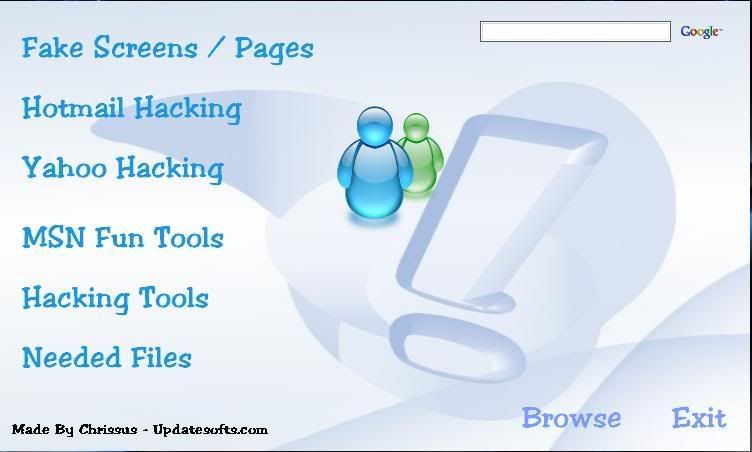
Hack Tools MegaPack : Complete A to Z Tools To hack MSN ,Hotmail Yahoo Account


CONTENTS OF THE PACKAGE:
Fake pages(Phising Pages)
MSN Fun Tools
Hotmail Hacker
MSN Flooder
Hotmail Killer
MSN SNIFFER
MSN Spy lite
Msn Chat Hack
MSN Password Retreiver
Hotmail Hacker Gold
Fake MSN Messanger
Fake Login Hotmail
MSN Chat Monitor and Sniff
Hotmail Brute Forcer

DISCLAIMER: DON'T USE THEM FOR ILLEGAL PURPOSES . I am Not Responsible For Any Activity. Hello Blogger Team If you Find It Inappropriate Please Delete It.


DOWNLOAD HERE :::;


http://rapidshare.com/files/22791818/Msn.AIO.Hack.rar


PASSWORD: www.final4ever.com

Subscribe via email N get Tips

Enter your email address:

Delivered by FeedBurner

Label Cloud

2009 (1) 2010 (3) 2011 (1) 2011 IPL Player (1) 3 IDIOTS (1) 3G dongle (1) Academics (3) ACCOUNT (1) ACRTICALS (3) acta (1) Addons (1) ADSL Router (1) Adzero (1) AIRTEL (14) Airtel 3G (1) airtel Grps (1) airtel proxy (1) android (3) Android Phone (3) Android Phone codes (1) ANTIVIRUS (7) ARP hacking (1) BAT (2) BHUVAN (1) BIOS (2) bitcomet (16) BITTORRENT (21) BLOG (4) BLOGGER (5) blu ray (1) BOLLYWOOD LATEST MOVIES (4) BOLLYWOOD MOVIES (4) BOOK (2) British rapper (1) BROADBAND (4) BSNL (7) BTJunkie (1) BTJunkie Shut down (1) BTJUNKIES (17) Cabana (1) calender (2) Caller ID (1) CAM RIPS (8) CAPCHA (1) CAT (1) CCNA (6) CCNP (1) CES 2011 (1) CHAT (2) CHATING (1) CHATTING (1) CHINA (3) Christmas (1) CID (1) CISCO (8) CISCO PRESS (2) CLONING (1) CODE (5) COLLECTION (2) COMMAND (2) CRACK (26) crack key (3) CRACKSOFTWARE (11) CSS (1) DAILY MOTION (1) Dan Bull (1) DAP (1) data backup (1) data storage (1) dekstop (1) Delhi 100 Year (1) DESI TORRENTS (20) DISK (1) DIY (1) DOCOMO (2) Docs (1) DOWNLOAD (13) DragonBall Browser (1) dvd (1) DVD Rip (12) dvd vs blu ray (1) E-mail (1) Ebook (7) EDUCATION (3) ERROR (3) ESET (1) ET (4) EXAM (8) EXPLORER (2) EXRTA TORRENT (20) extratorrent (10) FACEBOOK (8) facebook hacking (6) FACEBOOK TIMELINE (2) FACEBOOK Tips (1) FAT32 (1) FILESHARNING (1) FIRE FOX (14) First Bamboo Smartphone (1) FIRST ON NET (1) FOLDER (2) FORMAT (1) Free DNS (1) FREE GPRS (22) FREE MMS (12) FREE SMS (16) freesoftware (6) FRIST ON NET (1) FTP (1) full software (25) FUNNY (3) G.D (1) G.D. (1) GAME HACKING (12) GAME KEYS (2) GMAIL (12) GMAIL HACKING (16) GMAT (1) GNS3 (1) GOOGLE (53) GOOGLE CROME (20) Google Doodles (3) GOOGLE EARTH (23) Google Global DNS (2) Google Map. (1) Google Nexus (2) Google Nexus mobile (2) Google Open DNS (2) google pulgins (16) google Search Tips (7) google software (5) Google Tip (6) Google Tricks (6) GOOLGE HACK (35) GSM (2) gsm hack (1) GTALK (7) GURU OF HACKING (8) H (3) HA (1) HAC (3) HACK (100) HACKER (39) Hackers (14) HACKING (76) HACKINGTOOLS (38) Happy holidays (1) Happy holidays 2011 (1) HARDWARE (2) HOLLYWOOD MOVIES (4) hotmai (1) How To (1) how to backup data (1) how to store data (1) HSTR (2) HTML (1) HUTCH (2) I-PHONE (4) I-phone 4 (3) I-Phone 5 (3) I-Phone 5 Leak (2) I-phone Leak Video (2) IDEA (6) IDM software (1) IE (8) IE8 (6) IE9 (6) India Delhi (1) INFORMATION (3) INTERNET (22) IP-ADDRESS (6) iPhone 3 (1) iPhone 4s (1) iPhone 4s Tariff plan for india (1) iPhone 5 (1) iPhone4 (1) IPL 2011 (1) IPL 4 Auction News (1) IPL4 (1) IPLT20 Schedule (1) ISOHUNT (2) ISP (2) IT (2) jingle bells (1) JOKES (2) JTO 2009 (1) KEY (4) KeyBoard (1) Keyboard Tips (1) Kieron-Scott (1) KUTCH (1) learning software . Photoshop (2) lightroom (1) long term data backup (1) long term storage (1) Lumia 710 (1) Lumia 800 (1) MAC (2) MAC OS (1) Malware (1) Mango (1) MANGO Mobile OS (1) MANGO OS (2) MAT (1) MBA (3) Meego (1) MESSENGER (3) METACAFE (1) MICROSOFT (7) Microsoft Onenote (1) Microsoft PowerPoint (3) MOBILE (41) MOBILE CODES (27) Mobile Memory Card (1) Mobile Repair. (2) Mobile Save (1) mobile software (1) MODEM (2) MOTOROLA (2) MOUSE (1) MOVIES (5) MS-DOS (4) MS-OFFICE (3) MS-OFFICE KEYS (2) MSN HACKING (7) MSN PASSWORD (11) MTV (2) MYSPACE (1) N-SERIES (1) Network (5) NETWORKING (6) new camera (1) New Year (5) NEWS (3) NOD32 (1) NOKIA (10) Nokia lumia (1) Nokia Lumia 800 (1) Nokia Lumia 820 (1) Nokia Lumia 900 (1) Nokia Lumia 920 (1) Nokia Mango (2) Nokia meego (2) Nokia N9 (1) NORTON 360 (1) NOTEPAD (1) NOTIFICATION (1) NTFS (1) OPERA (5) ORKUT (16) ORKUT HACKING (18) ORKUT VIRUS (8) OUTLOOK (4) P2P (10) PAPER (1) PASSWORD (7) PC SUITE (3) Peer To Peer (8) PENDRIVE (1) PHILIPS (1) PHOTO (2) photoshop (1) pipa (1) Piracy (13) PIRATESBAY (26) PRINTER (1) PROXY SITES (3) Ragaa.com (1) RAPID HACK (6) rapidshare (1) Rapper protests piracy (1) REGISTRY (4) Reset Your Mobile Memory (1) RESULTS (4) ROADIES (4) Roadies 8.0 Raghu Rajiv RAnvijay Bani Roadies 5.0 Roadies 6.0 Roadies 7.0 (2) ROUTER (4) RSS (1) S60 (5) SAGEM (2) SAMSUNG (7) SARDAR (1) SCPIRTING (5) SCRAP (2) Search by Image (1) secret codes (2) Secure Your Computer (1) SECURITY (6) Serial key (2) SETTING (2) Shirt (1) SIM (1) SIMULATOR (3) SITEMETER HACK (1) SKYPE (1) Smartphone (1) SMS (7) SOFTWARE (17) Songs (1) Songs.pk (1) SOPA (2) SOPA Cabana (1) SPAM MAIL (3) statcounter (1) STD (1) storage (1) suraj fake (1) SYSTEM (1) T (1) TAG (1) Tango OS (1) TECH NEWS (1) THEMES (3) Timeline (1) TIMEPASS (4) TIP (110) TIPS (126) TNA (1) TOOLBAR (1) TOOLS (7) torrent (23) TORRENT HACK (9) TRICK (187) TROJAN (4) TUTORIAL (1) TV (1) TWEAK (8) UK (1) Unlimited Download (1) unlocking (1) UNRATED EDITIONS (3) USB (9) USB dongle (1) UTORRENT (15) VIDEO (4) Virus (2) Virus google (1) Virus total (1) Virustotal (1) VODAFONE (5) w3 counter (1) WAY2SMS (2) website (1) WI-FI (14) WINDOWS (96) WINDOWS 7 (44) windows 7 GodMode (2) Windows 7.5 OS (5) Windows 8 (9) windows 8 installation (2) WINDOWS VISTA (27) WINDOWS XP (92) windowsphone (1) Winzip (1) WIRELESS (12) WORDPRESS (1) WP7 (3) WP8 (3) WVIL (1) WVIL unbelievable (1) WWE PAYPER VIEW (1) WWE RAW (1) WWE SMACKDOWN (1) www.extrattorrent.com (5) XAT (1) XP Password (2) Xvid (9) YAHOO (18) YAHOO HACKING (11) yahoo messanger (4) YOUTUBE (9) YOUTUBE dOWNLOAD (3) YOUTUBE DOWNLOADER (3) youtube new look (2) zip7 (1)